Rebrand the Version Info plugin with your agency's name, author, and identity. Remove all third-party branding from client dashboards.
White Labeling
This is an Agency feature. Get white-labeling, role-based visibility, multisite management, and everything in PRO. Upgrade to Agency →
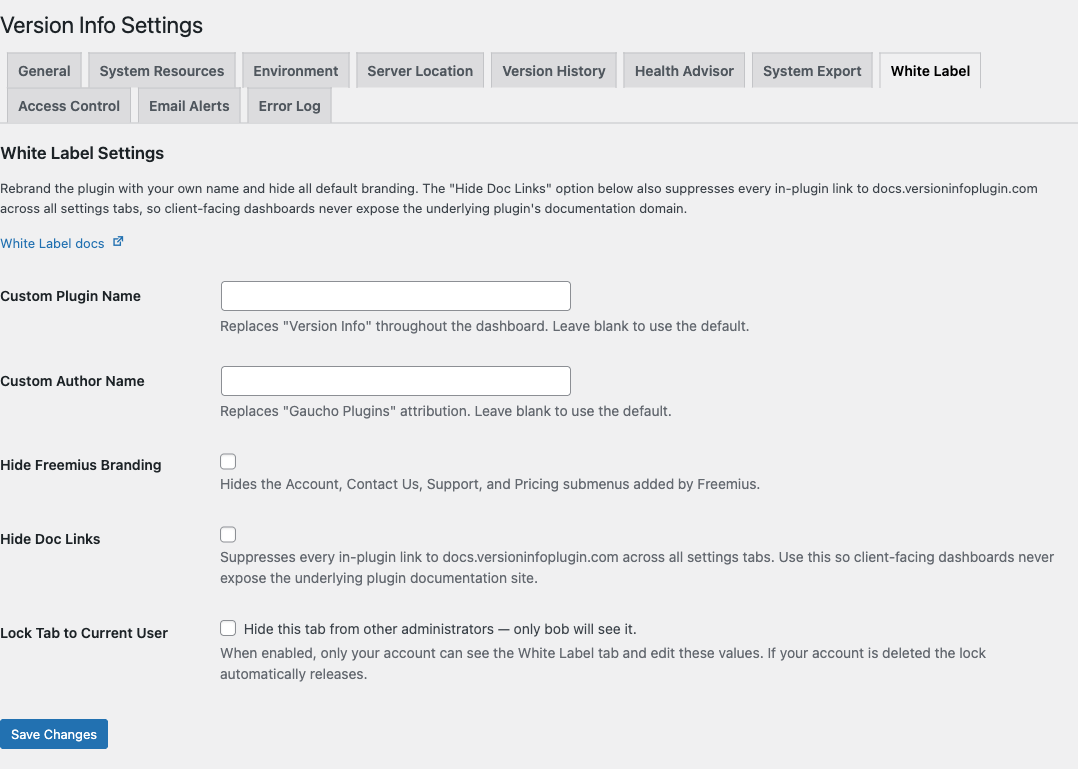
The White Labeling feature allows agencies to fully rebrand the Version Info plugin, replacing all mentions of "Version Info" and "Gaucho Plugins" with your own agency's name and identity. This creates a seamless, professional experience for your clients.
What Can Be Customized
| Setting | Description | Default |
|---|---|---|
| Plugin Name | Replaces "Version Info" everywhere in the admin | Version Info |
| Author Name | Replaces "Gaucho Plugins" as the plugin author | Gaucho Plugins |
| Hide Freemius Branding | Removes Freemius SDK menu items and branding elements | Off |
| Hide Doc Links (2.0.2+) | Suppresses every in-plugin link to docs.versioninfoplugin.com across all 10 settings tabs |
Off |
| Lock Tab to Current User (2.0.2+) | Hides the White Label tab from every other administrator and blocks direct POST writes to white-label options from non-owners | Off |
Where Rebranding Applies
The white label settings affect the following locations throughout WordPress:
- Plugins list page - The plugin name and author columns
- Admin footer - The version info display text
- Admin bar - The version info node labels
- Dashboard widget - The widget title
- Settings page - The page title and menu label
- Translation strings - All gettext-filtered strings within the plugin
Configuring White Label
- Navigate to Settings > Version Info > White Label (or your custom plugin name if already renamed).
- Enter your desired Plugin Name (e.g., "Agency Server Monitor").
- Enter your desired Author Name (e.g., "Your Agency Name").
- Optionally, check Hide Freemius Branding to remove SDK-related menu items.
- Click Save Changes.
Changes take effect immediately. There is no need to deactivate and reactivate the plugin.
Use Cases
- Client-facing dashboards: Present a cohesive, branded admin experience. Clients see your agency name instead of a third-party plugin vendor.
- Managed hosting: White-label the plugin as part of your hosting platform's built-in toolset.
- Reseller setups: Rebrand the plugin for resale as part of a larger maintenance package.
White labeling changes the display name only. The plugin slug and directory name remain version-info for compatibility with WordPress update mechanisms.
Hide Doc Links (2.0.2+)
With Hide Doc Links enabled, every inline link to docs.versioninfoplugin.com is suppressed across the General, System Resources, Environment, Server Location, Version History, Health Advisor, System Export, White Label, Access Control, Email Alerts, and Error Log tabs. Helper text that mentions the docs domain (so admins know what's being suppressed) is preserved, but the actual anchor tags are not rendered. Use this alongside the rebranding fields so clients never see the underlying plugin's documentation site.
The hide is applied globally via the public Plugin::doc_link( $slug, $label ) helper — third-party extensions that call the same helper inherit the suppression for free.
Lock Tab to Current User (2.0.2+)
The Lock Tab to Current User checkbox records the current administrator's user ID into the version_info_wl_lock_owner_id option. While the lock is held:
- The White Label tab disappears from the settings nav for every other administrator (filtered via the
version_info_settings_tabsfilter). - Direct POSTs to
options.phptargeting any white-label option from a logged-in non-owner are short-circuited by apre_update_option_*filter, so the lock can't be defeated by hand-crafting the form. - WP-CLI, WP-Cron, and other non-user contexts are not blocked (the filter early-returns when
is_user_logged_in()is false), so administrators can still recover the site via the command line if needed.
The lock has two automatic release paths:
- Owner deletion — the
deleted_useraction releases the lock the moment the owner's account is removed. - Lazy self-heal on
init— if the recorded owner ID no longer corresponds to a real user (for example because the account was deleted while the plugin was inactive), the option is reset on the next page load.
Both safety nets mean an agency can lock down the tab without trapping the site in an unrecoverable state.